Getting Started in Build a Car to Go Far
From empty garage to your first distance payout—what to build, drive, and buy on day one.
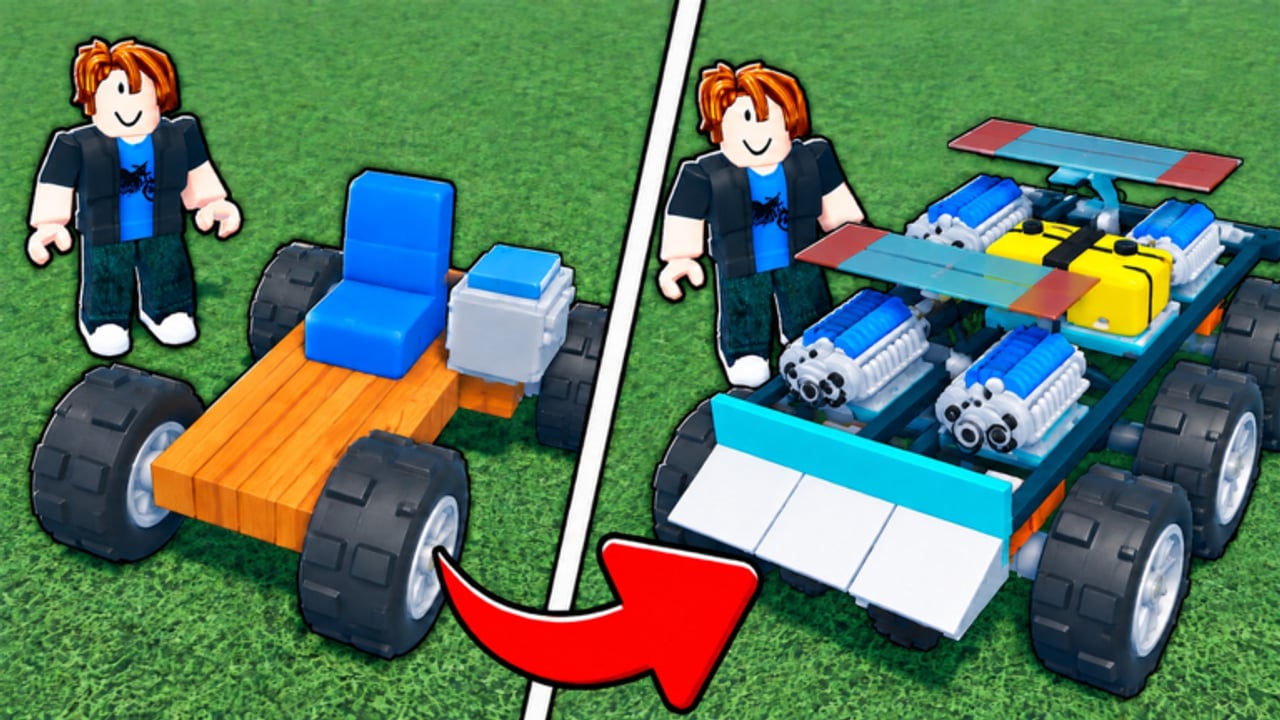
Build a Car to Go Far is a Roblox vehicle simulation by Runworks. You assemble a car in your garage, drive it as far as fuel and parts allow, earn coins from distance, open crates for stronger engines and rockets, eventually add wings and jets to fly, and keep earning while offline. This guide is the day-one path: spawn, build something that rolls, bank your first coins, and spend them without painting yourself into a corner.
The experience launched on September 8, 2026 (place 94998162120172). It runs on Roblox only, supports online co-op build-and-ride on servers of up to 10 players, and sits in the Simulation / Vehicle Sim genre. You do not need prior Plane Crazy or Build a Boat muscle memory—just a stable first chassis and a clear spending order.
Step 1: Land in the garage
When you join, you spawn near your garage workspace. Treat the garage as your workshop, not a race track. Walk the available part categories before you place anything permanent. Note where seats, wheels, engines, fuel tanks, structural blocks, and later flight parts live in the UI. If a short onboarding tip appears, finish it—early prompts usually highlight placement and launching a run.
Open Controls in another tab if you are on mobile or controller; day-one frustration is often input confusion, not a bad build. Favorites on the Roblox page and joining the creator’s community link (listed under Social Links on the experience page) help you catch crate events and patch notes later.
Step 2: Assemble a boring, stable first car
Your first goal is not a world record. Your first goal is a car that starts, rolls straight, and survives long enough to pay coins. Follow this minimal layout:
- Place a seat centered on a short chassis so you can enter and drive.
- Add wheels in a rectangular footprint—two front, two rear—aligned so the car sits level.
- Mount a starter engine along the centerline, preferably low and forward of the midpoint.
- Attach at least one fuel tank with clear capacity; empty tanks end runs early.
- Avoid stacking decorative blocks. Extra mass burns fuel for the same thrust.
Common day-one mistakes: wheels only on one side, engines hanging off a corner, seats so high the car tips on the first turn, and zero fuel. If the car flips at spawn, delete and rebuild lighter before you chase power. For deeper assembly rules, balance tips, and progressive upgrades, read How to Build.
Step 3: Take the first drive
Exit the edit mindset and launch a run. Accelerate smoothly, keep the nose pointed down the open path, and watch fuel. Distance—not style—pays coins. If you stall, flip, or run dry near the garage, that is still useful data: note whether the failure was traction, balance, or empty tanks.
Do not install wings or jets on attempt one. Flight parts add mass and control complexity. The flight update added propellers, jet engines, airplane engine crates, a longer map with new biomes, and updated flight controls, but those systems reward players who already earn steadily on the ground. Bookmark How to Fly for after your first few successful payouts.
Step 4: Understand the coin loop
Coins scale with how far you travel before the run ends. Longer surviving builds beat flashy builds that explode or stall early. After a run, return to the garage, bank the payout, and decide whether to rebuild, refuel, or spend. Your car can also earn while you are offline—set up a reliable earner before you quit for the day. Details and AFK tips live in Offline Earnings.
Early coin sinks that usually pay off:
- A clearer fuel upgrade so runs last longer
- A modestly better engine once the chassis already drives straight
- A crate when you can afford one without emptying the wallet needed for tanks
Early coin sinks that often waste the session:
- Buying every cosmetic block in the shop
- Stacking multiple weak engines before fixing wheel placement
- Rushing airplane crates before you can stabilize a flyer
Step 5: What to buy first
Priority order for most new players:
- Fuel capacity or efficiency — distance dies when tanks run dry.
- One better engine — more thrust on a stable frame beats three mismatched motors.
- Wheel or traction fixes if you spin or tip — control is free distance.
- First crate aimed at engines or rockets — see Crates and Rockets for spending priority and airplane crate timing.
- Wings / propellers / jets only after ground runs feel consistent.
Check the Tier List once you have a few crate opens so you know which engine and rocket tiers are worth keeping versus scrapping for the next roll. Better fuel tanks are called out as on the roadmap after the flight update—plan around current tanks until that lands.
Step 6: Codes, co-op, and session hygiene
Open the Codes hub whenever you hear about a promo. As of November 2026, no working promo codes are confirmed; do not sit idle waiting for free rolls. Invite friends for online build-and-ride sessions when you want help testing a layout—servers hold up to 10 players. Keep one “money car” that you trust for offline earnings and a second experimental build for flight or rocket tests so you never brick your only earner.
Before you log off, confirm the offline earner is placed and fueled the way you intend. Then skim Updates for load, performance, and control changes so tomorrow’s session matches the current build of the game.
First-hour checklist
- Garage open, seat + four wheels + engine + fuel placed level
- One clean distance run completed and coins banked
- Fuel or engine upgrade purchased before cosmetics
- Controls comfortable on your device (Controls)
- Know where crates, flight parts, and offline earning fit in the loop
- Bookmarked this wiki’s Guides Hub for the next deep dive
If anything still feels opaque—assembly, flight, crates, or AFK income—jump to the matching guide linked above. The rest of the wiki assumes you can complete a basic run and reinvest coins; this page exists so that assumption is true by the end of your first session.
Frequently Asked Questions
Quick answers to the most common questions.
What should I buy first in Build a Car to Go Far?
Prioritize fuel so runs last longer, then one better engine on a stable chassis. Open crates after those basics. Save wings and jets until ground earnings are reliable.
Do I need to fly on day one?
No. Learn a stable ground car first. The flight update is powerful, but flyers with poor fuel or balance waste early coins. Unlock flight after consistent distance payouts.
How do I earn coins as a beginner?
Drive as far as your build allows; payout scales with distance. Refuel, fix flips, and upgrade fuel or engines before stacking random parts. Offline earnings help after you leave a solid car running.
Can I play with friends?
Yes. Build and ride together online. Server size is 10. Use co-op to test builds while keeping one proven earner for solo and offline progress.
Are there beginner codes?
No working promo codes are confirmed as of November 2026. Check the Codes hub after updates or events instead of waiting before your first builds.